Monday, May 23, 2016

FREE Live Stream 2016 Jaboree

Thank you ANCESTRY!!
Just wanted to pass this on to any fellow mom genealogists who can't always make it to the conferences, a great opportunity to catch some of the classes while in the swing of Spring Time mAdDNesS with the kiddos!  You can watch live or at your convenience on the Live Stream site until July 5th.


Quoted from the Jamboree 2016 mailer,

"Last week, we announced the schedule for the pay-per-view live streamed sessions from the Genetic Genealogy 2016 Conference. Thank you to genealogists around the world who have already registered for the DNA pay-per-view sessions.  

Now, it's time to release the rest of the news you've been waiting for - the schedule for the FREE live streaming from the 47th Annual Southern California Genealogy Jamboree.

We are very grateful to our Diamond Sponsor, Ancestry.com, which is underwriting the cost of the free Jamboree Live Stream. With their generous support, SCGS is once again able to bring you 14 hours of high-quality family history education free of charge
."

I've checked out some of the classes and am about to register myself. 

Visit the Jamboree homepage to see class lists, registration info, and more information about the Genetic Genealogy classes.  Or check out the email that has a synopsis of all the information. 


Happy streaming...

Saturday, April 23, 2016

Some things only a Genealogist will understand…

I had a huge stack (as you can see) of binders to digitize, but the pages were those sticky IMG_1325 (2)kind where it’s like photograph suicide to remove…the only solution, a book scanner.  So to the BYU Family History Library I headed this weekend.  I couldn’t carry them all in so in enters the double stroller, I knew motherhood was preparing me for more than just mothering.
Sadly, that amazing book scanner I used last time was apparently on trial at the time and has since been removed.  To those of you interested in using it, they said they’ll be purchasing one in the 2017 budget year, so it will return in the future.  BUT--I had a task to do so I decided to check out the other options for book scanners.  They have some amazing flatbed scanners that really do a great job and are quite quick…12 huge binders of photos and 4 hours later I was done.
The great news is that during my time in the library I made some friends.  I love chatting it up with people and helping when I can, so I found myself in conversations with various people.  The girl next to me, Afton, was scanning some adoption paperwork for her younger siblings from Russia.  We got into conversation and I learned that she is a BYU student majoring in Family History. Yes, that IS what I said, majoring in FAMILY HISTORY…..somehow I doubt any other school offers such a major. Can I just say, I missed my lot in life.
She was great to chat with--definitely helped move the project along. The best part was that she introduced me to this new site, provided by none other than the BYU Family History Department.  Thank you BYU, you are continuously providing me with new genealogy toys.
Virtual Pedigree: https://virtual-pedigree.fhtl.byu.edu/Home screen
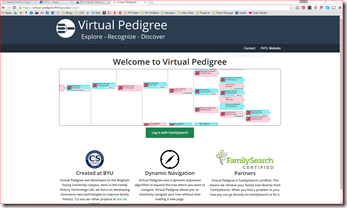
It’s a FamilySearch partner site, so it uses your FamilySearch tree.  It uses what they call Dynamic Navigation, which basically scrolls around and zooms according to where you move your cursor and what you click on.  It’s easy to navigate and very intuitive.
The idea behind the program is to help you easily find the lines in your family tree that need work, and have some record hints ready to go so you can get right in to the research. It’s great for helping you get started quickly when you’re not really sure where to start, especially for those of us with pioneer ancestors and lots of work that is already done.  Find those cousins that got lost in the shuffle over the years, and hopefully their families.
inside
To use it, scroll to an ancestor several generations back (late 1700s is where I like to start), then click on that ancestor and select “set as root.”  This will populate that person as the central person in the tree, then start populating their descendants and ancestors.  You’ll see colored circles among their descendants and ancestors that indicate different research tips.  You’ll also notice on the right hand side a box entitled “Low Hanging Fruit”.  These are the ones with record hints already found in FamilySearch.  Awesome, right! The number next to it indicates how many Record Hints they currently have.
Okay, now go play, and let me know what you think!

Friday, April 8, 2016

A simple work-around for the loss of Google App Launcher

So I know this isn't exactly part of the topic for my blog, but seeing as technology is a huge part of my life and a huge part of why I love doing genealogy I feel that it is in fact appropriate.

I spent several hours today trying to figure out how to install the Chrome App Launcher on my new computer.  I am an avid user of Google and many of its applications, and I often try to encourage people to use their product because they offer so many amazing and wonderful features. They have tons of great resources even for genealogy, but that's a post for another day.  So when I discovered the Chrome App Launcher a few years ago, I was thrilled because frankly I use Google stuff way more often than I use any Windows apps but I have a PC.  That said, after hours of getting stuck without an option to download the launcher, I finally found this article, Retiring Chrome App Launcher.  Basically Google has decided to discontinue support of the Chrome App Launcher, and remove it, so obviously they no longer have it available for download. Blah!! 

Without going into how incredibly disappointed I am about their decision, I wanted to offer a work-around to others experiencing this problem.  I spent some time trying to figure out another option because of course the Windows Start screen doesn't display the apps with their correct thumbnails, so creating a "group" (I think that's what they're called) on the start menu isn't a good option.


So here's the WORK-AROUND:

Open Chrome, and go to your app library. Visit: chrome://apps/

Right click on each app that you'd like to have available on your desktop and choose "Create Shortcut". Check the "desktop" check-box and click "create".


This will add a shortcut to your desktop for every app you'd like to have available.  Don't worry we
won't leave them there.

Now create a folder and name it whatever you'd like it to show on your Taskbar, I used "Chrome
Apps".  File that file wherever you'd like it to be.  I just used the original location that the apps were actually stored but anywhere will suffice as long as you can find it.


Now RIGHT CLICK on the Taskbar, go to "Toolbars" then select "New Toolbar".


Navigate to the folder you created with your Chrome Apps and select it. VOILA, you now have a little toolbar labeled as Chrome Apps that you can click and it opens up all those shortcuts.

It's not as pretty as the launcher but it works pretty much the same.


I'm sure there are other solutions, but hopefully this will be helpful to someone.


Thursday, March 31, 2016

Truly March Madness...DiGITizE your old stuff!

Aside from my brackets being shot after 2 days of basketball madness, my parents' basement flooded.

It was a mess.  THANKFULLY about 5 years ago I went on a digitizing craze.  During that time I digitized almost all my mom had as far as family photos and documents were concerned.  Unfortunately, due to my mad organization skills tons of the photos I had digitized got ruined because they were all together in folders and the dampness of the house made the photographs all stick together.  Ironically the ones heaved in drawers were totally fine because they weren't tightly packed. LESSON LEARNED.

But after a full weekend of cleaning, sifting, and sorting here's a peak at my mess that I have to sift through now...

Apparently after my uncle passed away my mom had inherited a lot of his documents and photos which also had a lot of family history stuff in there.


Look at this gem...

It's a family log from 1901.  It has tons of names and dates of births, deaths, marriages, blessings, baptisms, etc...I was so excited to get it digitized.  I sneaked a visit into the BYU Family History Library last weekend with my 7 year old to get it done.  She appeases my obsession once in a while. Sometime she even pretends to enjoy it with me.  The library has some great book scanners, and it was super fun to involve my kiddo, though she insisted that she wasn't actually doing family history work because "it was only pushing a button".

I LOVE finding new treasures!  There's lots of other treasures in this pile too...but it'll take some time before I'm able to report on all of them.

Bottom line...if I hadn't digitized when I did, I'm certain we would have lost some irreplaceable stuff. Unfortunately we did lose some originals but we have really great digital images of those pictures that we can print, copy or share.  Yes, it's a lot of work and it requires some planning, but it's worth it.  So if you haven't yet digitized your stuff and you'd like some guidance on where to start, check out my post about DIY Digitizing.

Monday, March 21, 2016

DIY Scanning

Scanning or digitizing your family treasure trove can seem to be an incredibly daunting task, but it doesn't have to be.  If you take a few minutes to educate yourself on the basics then you can make an informed decision about the best route for you and your archive.

I got going on it myself in 2010.  I admit photos was an obsession before family history entered my radar--I'd say photos, digital scrap-booking, and family movies was what led me to discover my love for genealogy.  So I'm pretty sure I am genetically hard-wired this way.  So with 6 years of experience under my belt and research on the subject I'll give you the basics.

First of all, assess what you've got, and what you can and want to digitize.  You'll likely be surprised at the things that you'll find as you start to dig.  Things like photos and documents are easy to scan, but many of us have things like film, tape, & heirlooms that can be a little more tricky to digitize.

Next, learn a bit about file formats and resolution.  You'll want to know what your ultimate goal is...are you digitizing for display, preservation, or just as back up.  Here are some super brief articles to get you up to speed quickly: Learn about file formats & Learn about resolution.

Now you'll want to decide which approach is best for you, here are some ideas and things to consider about each. I'll save the best for last...

Thursday, February 18, 2016

A Sneak Peak into a New Cloud: "Taking Back the Internet"

I'm bound to write more on this subject in the future, but I've gotta give a sneak preview.  Cloud by Daplie is a new product I discovered on Innovators Alley at RootsTech--by far the best addition to RootsTech this year btw, but that's beside the point.
The product isn't quite ready for market yet, but I got a sneak peak today giving some feedback on the product to the developers.  For those of you who are sick of paying monthly fees for online storage, you're going to LOVE this product! The slogan they used when explaining it to me was "We're taking back the internet." I love it! Who doesn't want more control and to understand better where their stuff is stored? Basically just imagine being able to purchase as much storage space as you need--NO limits and NO monthly fees--awesome right?!!  You just purchase the hard drive space you need and the attachable server and voila, you can access your files anytime, anywhere, from any device. Plus, the interface that they're putting together is AMAZING with new features I haven't found on any other platform yet.  I'm super excited to give it a try.
Sign up now to GET EARLY ACCESS.
Or if you want to learn more, here's a great post I found by the creator:
https://daplie.com/articles/introducing-daplie/

Wednesday, February 10, 2016

Back in the swing 2016

After a 2 year hiatus, I'm ready to get back in the swing. I attended RootsTech 2015 and remember I was super motivated to get going on this blog again, because every year, RootsTech just re-motivates me and makes me want to share all that I'm discovering about this constantly changing market. BUT unfortunately, baby #3, demands of mommy life, church life, and community life, overtook MY LIFE, and I wasn't able to rekindle.
BUT now it's 2016... I loved this years theme "Celebrating Families across Generations", because as a Mom-o-three, I'm always trying to find new ways to connect my kids to this fascinating work that I love, genealogy.  So RootsTech 2016 was a success. I've already started testing out new products and renewing old ones that I love, shout out to StoryWorth (LOVE it!). So here's to a new beginning with this blog. Being once again updated from sunny Pacific Grove, California.